The Edward Snowden guide to encryption: Secret 12-minute homemade video
- Snowden made video to teach reporter how to speak with him securely
- It explains how to use Public Key Encryption to scramble online messages
- Privacy campaigners call on ordinary people to learn how to use the method
 Whistleblower: The tutorial Edward Snowden made for reporters on to avoid NSA email surveillance has been made public for the first time
Ordinary people must learn to scramble their emails, privacy campaigners said today, as an encryption how-to video made by Edward Snowden was made public for the first time.
The former NSA employee who blew the whistle on the agency’s all-pervasive online surveillance made the video to teach reporters how to communicate with him in secret.
The 12-minute clip, in which Mr Snowden has used software to distort his voiceover, explains how to use free software to scramble messages using a technique called Public Key Encryption (PKE).
The video’s description on Vimeo says: ‘By following these instructions, you’ll allow any potential source in the world to send you a powerfully encrypted message that ONLY YOU can read even if the two of you have never met or exchanged contact information.’
Mr Snowden made the video last year for Glenn Greenwald in an effort to get the then-Guardian reporter to communicate securely with him online so he could send over documents he wanted to leak.
Viewers may find the video difficult to follow. Mr Greenwald himself admitted he wasn’t able to finish it. It took him seven weeks and help from experts to finally gather the expertise to get back to Snowden.
The video’s publication comes as more and more internet users are adopting encryption techniques after the alarm caused by Mr Snowden’s revelations about communications surveillance.
He leaked documents which showed the NSA and its UK counterpart GCHQ were able to spy on virtually anybody’s communications and internet usage, monitor social network activity in real time, and track and record the locations of billions of mobile devices.
There was outrage when it emerged that, contrary to promises the NSA made to Congress, these technologies were being used to track U.S. citizens without warrants and to tap the communications of leaders of allied countries.
One answer to the risks to freedom that such surveillance pose is to scramble online communications so that government agencies can no longer eavesdrop at will.
However, the encryption technologies currently available can be difficult to use and privacy activists have called on internet companies to include them in their products at the source.
Meanwhile, the campaign to end blanket surveillance continues as experts warn encryption tools are unlikely to make their way into the mainstream while internet firms continue to make their profits on the back of users’ personal information.
Scroll down for video

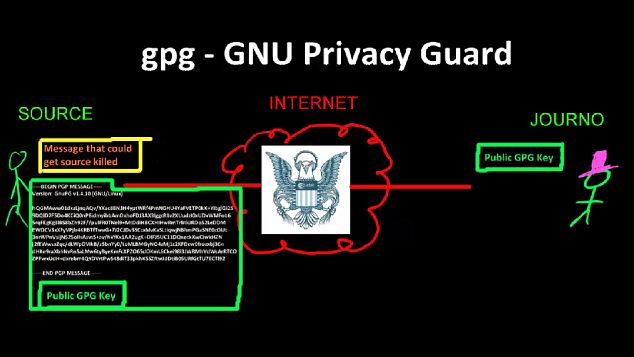
How-to guide: The video begins with a basic outline of the theory behind Public Key Encryption. It is voiced over by Mr Snowden, who has disguised his voice to avoid detection by NSA or GCHQ spies

Detailed: The video then explains how to use a free program called GPG4Win to scramble messages using Public Key Encryption then send them over Tor, software that allows people to use the internet anonymously
In Mr Snowden’s video, he explains how traditional emails are sent as plain text – unencrypted by default – across the internet, allowing anyone able to intercept them to easily read their contents.
‘Any router you cross could be monitored by an intelligence agency or other adversary [such as] a random hacker. So could any end points on the way there, a mail server or a service provider such as Gmail.
‘If the journalist uses a web mail service personally or its provisioned by their company, the plain text could always be retrieved later on via a subpoena or some other mechanism, legal or illegal, instead of catching it during transit. So that’s doubly dangerous
‘The solution to that is to actually encrypt the message. Now one of the problems with encryption typically is that it requires a shared secret, a form of key or password that goes between the journalist and the source.
‘But if the source sends an encypted file across the internet to the journalist and says “Hey, here’s an encrypted file. The passwork is cheesecake,” the internet is going to know the password is cheesecake.
‘But public key encryption such as GPG allows the journalist to publish a key that anyone can have based on the design of the algorithm, and it doesn’t provide any advantage to the adversary.’
The video goes on to specifically explain how to use a free program called GPG4Win to scramble messages using Public Key Encryption then send them over Tor, a piece of software that allows people to use the internet anonymously.
It’s lessons, as well as help from experts, allowed Mr Greenwald to communicate securely with Mr Snowden to publish what has since been called the most significant leak in U.S. history. It has been made public to coincide with the release of Mr Greenwald’s book, No Place To Hide, in which he tells the story of the scoop.
Privacy campaigners told MailOnline today that all internet users should be now using encryption technology to preserve their privacy and maintain freedom of speech in the face of government spying.
Javier Ruiz, director of policy at the Open Rights Group, said: ‘Emails are like postcards and encryption is a tamper-proof envelope.
‘It’s probably obvious that journalists, MPs, doctors, lawyers or anyone transmitting confidential information online should always encrypt their emails to keep that information secure.
http://youtu.be/jo0L2m6OjLA
‘But since the Snowden revelations, more and more ordinary citizens are adopting encryption software to help keep their emails private.
‘If encryption is to be used on a mass scale, it will require companies like Google, Apple and Microsoft to embed encryption in their tools.’
But TK Keanini, chief technology officer at internet security firm Lancope, said that it was unlikely that major internet companies would begin including encryption functions in their services as standard.
‘PGP and similar programs are just too complicated for the masses,’ he said. ‘Managing key pairs, understanding revocation and all that stuff is too complicated for most, and thus adoption over the past 20 years has been limited to the highly technical – the uber geeks.
‘Now, if a service like gmail.com had an option in there to perform digital signing and encryption in a way that most people could use it, that would have a huge impact; but it will never happen because Google and other ‘free’ services make their money on the fact that your data is in the clear and they can use it to market services to you.
‘People need to understand that when people offer free services, you and your information are the payment.’
‘While people can use technology to empower themselves, we must also challenge the policies of Government and intelligence agencies to end the unlawful mass surveillance of people around the world’
Mike Rispoli, a spokesman for Privacy International, echoed those sentiments, but added that there needs to be more pressure on government to stop them from snooping on the private lives of ordinary people.
‘It is critical that people use all technology at their disposal to keep their communications private and secure,’ he said.
‘We should all support the creation and widespread use of these tools. Ultimately, however, people should never have to do more or go to extra lengths to protect their rights.
‘This is why we need political, legal, as well as technological, solutions to ensure that our privacy rights are protected.
‘While people can use technology to empower themselves, we must also challenge the policies of Government and intelligence agencies to end the unlawful mass surveillance of people around the world.’
By DAMIEN GAYLE
via Dailymail.co.uk