An NSA Coworker Remembers The Real Edward Snowden: ‘A Genius Among Geniuses’

An NSA Coworker Remembers The Real Edward Snowden: ‘A Genius Among Geniuses’

snowden-genius

Perhaps Edward Snowden’s hoodie should have raised suspicions.

The black sweatshirt sold by the civil libertarian Electronic Frontier Foundation featured a parody of the National Security Agency’s logo, with the traditional key in an eagle’s claws replaced by a collection of AT&T cables, and eavesdropping headphones covering the menacing bird’s ears. Snowden wore it regularly to stay warm in the air-conditioned underground NSA Hawaii Kunia facility known as “the tunnel.”

His coworkers assumed it was meant ironically. And a geek as gifted as Snowden could get away with a few irregularities.

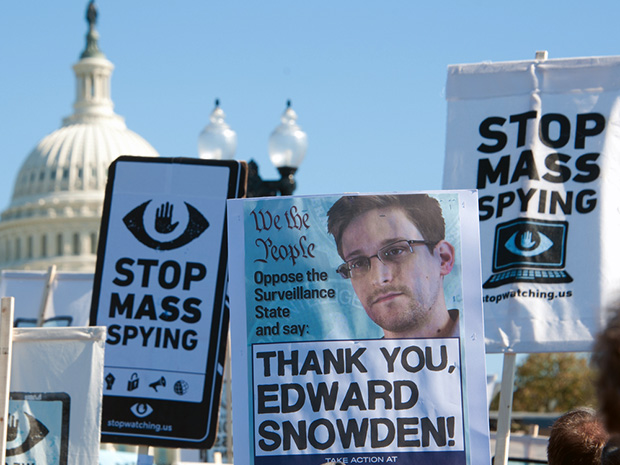
Months after Snowden leaked tens of thousands of the NSA’s most highly classified documents to the media, the former intelligence contractor has stayed out of the limelight, rarely granting interviews or sharing personal details. A 60 Minutes episode Sunday night, meanwhile, aired NSA’s officials descriptions of Snowden as a malicious hacker who cheated on an NSA entrance exam and whose work computers had to be destroyed after his departure for fear he had infected them with malware.

But an NSA staffer who contacted me last month and asked not to be identified–and whose claims we checked with Snowden himself via his ACLU lawyer Ben Wizner—offered me a very different, firsthand portrait of how Snowden was seen by his colleagues in the agency’s Hawaii office: A principled and ultra-competent, if somewhat eccentric employee, and one who earned the access used to pull off his leak by impressing superiors with sheer talent.

The anonymous NSA staffer’s priority in contacting me, in fact, was to refute stories that have surfaced as the NSA and the media attempt to explain how a contractor was able to obtain and leak the tens of thousands of highly classified documents that have become the biggest public disclosure of NSA secrets in history. According to the source, Snowden didn’t dupe coworkers into handing over their passwords, as one report has claimed. Nor did Snowden fabricate SSH keys to gain unauthorized access, he or she says.

Instead, there’s little mystery as to how Snowden gained his access: It was given to him.

“That kid was a genius among geniuses,” says the NSA staffer. “NSA is full of smart people, but anybody who sat in a meeting with Ed will tell you he was in a class of his own…I’ve never seen anything like it.”

When I reached out to the NSA’s public affairs office, a spokesperson declined to comment, citing the agency’s ongoing investigation into Snowden’s leaks.

But over the course of my communications with the NSA staffer, Snowden’s former colleague offered details that shed light on both how Snowden was able to obtain the NSA’s most secret files, as well as the elusive 30-year old’s character:

  • Before coming to NSA Hawaii, Snowden had impressed NSA officials by developing a backup system that the NSA had widely implemented in its codebreaking operations.
  • He also frequently reported security vulnerabilities in NSA software. Many of the bugs were never patched.
  • Snowden had been brought to Hawaii as a cybersecurity expert working for Dell’s services division but due to a problem with the contract was reassigned to become an administrator for the Microsoft intranet management system known as Sharepoint. Impressed with his technical abilities, Snowden’s managers decided that he was the most qualified candidate to build a new web front-end for one of its projects, despite his contractor status. As his coworker tells it, he was given full administrator privileges, with virtually unlimited access to NSA data. “Big mistake in hindsight,” says Snowden’s former colleague. “But if you had a guy who could do things nobody else could, and the only problem was that his badge was green instead of blue, what would you do?”
  • As further evidence that Snowden didn’t hijack his colleagues’ accounts for his leak, the NSA staffer points to an occasion when Snowden was given a manager’s password so that he could cover for him while he was on vacation. Even then, investigators found no evidence Snowden had misused that staffer’s privileges, and the source says nothing he could have uniquely accessed from the account has shown up in news reports.
  • Snowden’s superiors were so impressed with his skills that he was at one point offered a position on the elite team of NSA hackers known as Tailored Access Operations. He unexpectedly turned it down and instead joined Booz Allen to work at NSA’s Threat Operation Center.
  • Another hint of his whistleblower conscience, aside from the telltale hoodie: Snowden kept a copy of the constitution on his desk to cite when arguing against NSA activities he thought might violate it.
  • The source tells me Snowden also once nearly lost his job standing up for a coworker who was being disciplined by a superior.
  • Snowden often left small, gifts anonymously at colleagues’ desks.
  • He frequently walked NSA’s halls carrying a Rubik’s cube–the same object he held to identify himself on a Hong Kong street to the journalists who first met with him to publish his leaks.
  • Snowden’s former colleague says that he or she has slowly come to understand Snowden’s decision to leak the NSA’s files. “I was shocked and betrayed when I first learned the news, but as more time passes I’m inclined to believe he really is trying to do the right thing and it’s not out of character for him. I don’t agree with his methods, but I understand why he did it,” he or she says. “I won’t call him a hero, but he’s sure as hell no traitor.”

via Forbes.com

How Online Privacy Tools Are Changing Internet Security

How Online Privacy Tools Are Changing Internet Security

How online privacy tools are changing Internet security and driving the (probably quixotic) quest for anonymity in the digital age.

For many of us, the Internet is like a puppy—lovable by design and fun to play with, but prone to biting. We suspect that our digital footprint is being tracked and recorded (true), mined and sold (super true), but we tolerate these teeth marks because, for many of us, the Internet is irresistible, its rewards greater than its risks. In a 2011 Gallup poll, more than half of those surveyed said they worried about privacy issues with Google, yet 60 percent paid weekly visits to the search giant. As long as we clear our search terms, block cookies, use antivirus software and see that our social media presence isn’t too social, we’ll be OK. Right?

Increasingly, this sense of security is an illusion. “I don’t trust anything on the Internet,” says digital whistleblower John Young. “Cybersecurity is a fiction.” He would know: Young was a seminal member of WikiLeaks and runs Cryptome, a website that posts “documents prohibited by governments worldwide”—think FBI files and manuals detailing how Microsoft spies on us. He argues that the tenuous architecture of the Internet prevents it from being truly secure.

Case in point: Mat Honan, the wired.com writer whose entire digital existence was destroyed by hackers within the span of an hour last August. The cyberbaddies broke into Honan’s Gmail, accessed his Apple ID account and deleted data on his MacBook, iPhone and iPad, including photos of his family. The scariest part of this privacy breach—aside from the fact that its victim is a tech writer (ahem)—is that the hackers hijacked his online world using nothing more than his billing address and the last four digits of his credit card, information that’s relatively easy to obtain online if you know the right tricks. Honan’s story served as yet another reminder that THE INTERNET IS NOT SAFE, PEOPLE.

So is it time to go off the grid? That’s one option. Another is to ditch the puppy analogy and view the Internet the way those who demand higher than average levels of security do: as a giant tracking device that can be outsmarted. Countless tools exist to cloak your digital identity: email encryption services, “meta search engines” that promise private browsing and networks and software that offer a degree of anonymity and, in some cases, entry to previously inaccessible websites. Sounds like the stuff of spy novels, but these tools are available to anyone with an Internet connection.

Of course, the idea of online anonymity clashes with the prevailing “share everything” approach to the Internet—and the moneymaking opportunities therein—which makes it a fascinating and complicated topic. Its opponents say it fosters hate and crime (Mark Zuckerberg’s sister, Randi Zuckerberg, who used to head up marketing at Facebook, famously called for the end of online anonymity earlier this year, stating that “People behave a lot better when they have their real names down”), while privacy champions argue that anonymity grants greater security and freedom of expression. The John Youngs of the world will tell you that being truly unidentifiable online is a fairy tale. But every fairy tale has a lesson, and even if you get hives thinking about trading your identity for a more armored online existence, there’s plenty to learn from the heroes, villains and everyday secret-keepers attempting to go John Doe in the digital realm.


Photo by Richard Fleischman.

There’s a famous New Yorker cartoon from 1993 that shows two dogs in front of a computer, one saying to the other, “On the Internet, nobody knows you’re a dog.” This was a novel proposition in the Web’s early days. Liberated from our actual identity, we chatted in forums using ridiculous pseudonyms such as “beaniebabyaddict47” and posted comments as “Anonymous,” our snarky alter ego. Anonymity felt great, even if technically it was just a state of mind. But then social media arrived, and with it the idea that transparency is power. Suddenly, we decided it was important to tell the Internet our real name and what we had for breakfast.

For those who want to keep their breakfast habits a secret, the rise of transparency created new security risks. Enter the digital cloaking device. In 2002, the U.S. Naval Research Lab debuted Tor, one of the more effective “anonymizers” to date. A group of M.I.T. grads developed it with the goal of masking one’s IP address, the string of numbers that reveals a given computer’s physical location (snoops and hacks love your IP because it brings them one step closer to determining the real you).

At the heart of Tor is a concept called “onion routing,” which sends the “packets” of info needed to get from points A to B online on a winding route through a network of randomly selected servers, each one knowing only the packet’s previous and next stops in the chain, thereby hiding the user’s IP and allowing a degree of anonymous Web browsing. Confused? In the simplest terms, Tor separates the origin and destination of your online communication, essentially tunneling you through the Web.

The U.S. Navy financed this tunnel to protect government communications, but its code was released to the public because, as Karen Reilly, development director for the nonprofit Tor Project, puts it, “A Navy anonymity network wouldn’t work. The idea is to have many diverse users so that you can’t tell who somebody is just by virtue of them using Tor.” Using seed money from the Electronic Frontier Foundation, a digital rights advocacy group, the Tor Project formed a decade ago to grow Tor’s user base and maintain and improve its network. Today, Reilly estimates that Tor has about half a million daily users and 3,000 to 4,000 “nodes,” volunteer servers that hopscotch you through the network.

Tor is available as a free download on torproject.org. This software includes a Tor-enabled version of the Firefox Web browser that hides your IP address and forces an encrypted connection where available. Sounds great, but like most anonymizing tools, Tor is flawed. It slows Web browsing and, if someone decided to keep an eye on a large enough swath of the Internet, he could theoretically analyze data patterns to guess where the communication originated.

These weaknesses haven’t stopped hundreds of thousands from downloading the service. Reilly says most people use it to protect their browsing because “they think it’s creepy to be tracked. They don’t like the fact that there’s a file on them somewhere being kept by an advertiser who knows what cereal they like to eat.” And there are more weighty reasons to use Tor: Journalists and activists in oppressive regimes use it to circumvent Internet censorship. It’s been reported that Arab Spring revolutionaries tapped Tor to access Facebook and Twitter, both of which were blocked at various points by Egypt, Iran and others (incidentally, Iran has the second-highest number of Tor users; the United States has the most).

Criminals, trolls and other creeps also love Tor—no surprise given their affinity for the Internet in general. In the mood for some heroin? Silk Road is a one-stop online shop for illegal goods that uses Tor to hide its location from users and, ostensibly, law enforcement. Anonymity haters reference nasty sites like these when stating their case, but Reilly thinks this is misguided. “If Tor didn’t exist, criminals would have other options.”

Other options used by both crooks and law-abiders include virtual private networks, which are faster than Tor and sometimes less secure—and generally not free. Like Tor, VPNs provide a secure connection between computers and can be used as a gateway to websites that would otherwise be inaccessible. VPNs are all the rage in China, where government censorship of the Internet is the norm. Mara Hvistendahl, a Shanghai-based correspondent for Science magazine, has experimented with different privacy tools since moving to the city in 2004. She started with Tor, but found it too slow for regular Web browsing, so she switched to VPNs to access Gmail and Google Scholar, sites that have been blocked by Chinese censors. “Every foreign journalist I know in China uses a VPN,” she says. Another VPN user—a China-based English and journalism teacher who spoke to Sky on the condition of you know what—says she pays for a VPN called Astrill to reach Facebook.

Both women mentioned pairing VPNs with other privacy tools. Hvistendahl has heard of reporters combining VPNs, multiple SIM cards and the secure email service Hushmail to protect sources. If it’s true that no online cloaking device is totally effective, this bundling strategy might be our best bet for protecting ourselves online—though good luck trying to convince the average Web user to do it.
Most people have a difficult time with far-off risk,” says Ashkan Soltani, a former technologist with the Federal Trade Commission’s privacy division who’s currently a privacy/security researcher and consultant. “That’s why we passed seat belt laws. The likelihood of you getting in a car accident is low, but the harm that you might experience in that accident is potentially high. It’s the same online. We’re bad at figuring out how our data could be used against us in the future, so we don’t care.”

We should care, says Lee Tien, senior staff attorney for the Electronic Frontier Foundation, because data privacy laws are “not incredibly strong.” This is an understatement in countries such as China and Iran, where Web users have little or no online freedom. The US has the Wiretap Act and the Stored Communications Act, both of which address basic privacy issues such as police needing an interception order to tap emails. But these laws fail to look at how private corporations handle our digital footprint, and as a result, we’re at the mercy of, say, Facebook’s data policy or Google’s data policy, and we all know that they have our best interests in mind . . . .

But here’s the real stinger: Let’s say you decide to take control of your digital footprint and start using some of the tools mentioned above. Also, you begin paying closer attention to the privacy policies on the various sites you visit, clicking “do not track” when possible and opting out of initiatives such as Google’s targeted ads program, which is based on the content of your email. Congratulations, responsible netizen, you now have more online security than most—have fun on your cumbersome, hard-to-manage, less optimized version of the Internet!

Ken Berman puts it another way: “If you want to be on Facebook, there are certain things—anonymizing tools that prevent tracking, prevent cookies, prevent identifying behavior—that make some of these social media tools difficult to work with.” Berman, an IT security expert who for years worked at the Broadcasting Board of Governors (the United States’ international broadcasting arm), sees two options for Internet users: “Either you say, ‘I give in. I enjoy the Web, so I’ll put up with walking by a store and getting a text message that says go in this store and you’ll get an immediate 10 percent coupon.’ Or you say, ‘No, I don’t want to play in that world, so I’m going to use Tor or a VPN. I’m going to clean up my session every time I log out and not leave any remnants of my behavior.’ I don’t see how there’s anything in between.”

Soltani is more optimistic. He sees a future where governments pass stronger digital privacy laws and geeks build easier-to-use privacy controls that work seamlessly with the slobbering puppy version of the Internet we all love. In the meantime, he’s doing his best to educate as many people as possible on the virtues of proper digital hygiene, whether that means using anonymity tools or simply being more aware of the fact that you leave a data trail wherever you go these days (don’t even get us started on smartphones).

“My big thing is to demystify I.T.,” says Soltani. “It doesn’t help to think of it as magic or something that’s bringing the world to an end. Tech changes the way we interact with one another and our society—and we should be cognizant of that and adjust accordingly.”

For now, it remains to be seen how these changes will affect online anonymity, a concept that begs important questions about what sort of society we want to live in: Is anonymity a right? Should we be able to engage in discourse anonymously? Should beaniebabyaddict47 be allowed to have such an obnoxious alias? Stay tuned. //
With consultation on information systems security from Matt Lange at Milwaukee Area Technical College.

via DeltaSkyMag
Cryptoparty Goes Viral: Pen testers, Privacy Geeks Spread Security to the Masses

Cryptoparty Goes Viral: Pen testers, Privacy Geeks Spread Security to the Masses

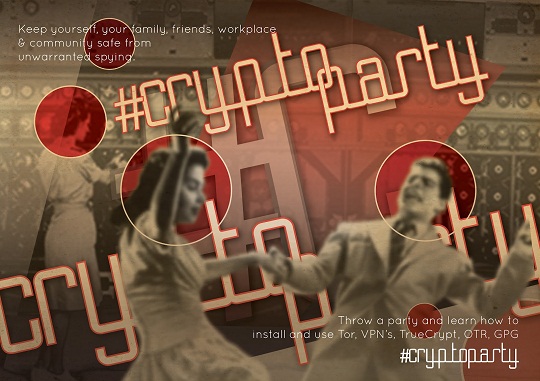
Security professionals, geeks and hackers around the world are hosting a series of cryptography training sessions for the general public.

The ‘crytoparty’ sessions were born in Australia and kicked off last week in Sydney and Canberra along with two in the US and Germany.

Information security experts and privacy advocates of all political stripes have organised the causal gatherings to teach users how to use cryptography and anonymity tools including Tor, PGP and Cryptocat.

Multiple sessions were proposed in Melbourne, Sydney, Adelaide, Canberra, Perth and two in Queensland. A further 10 were organised across Europe, Asia, Hawaii and North America, while dozens of requests were placed for sessions in other states and countries.

The cryptoparties were born from a Twitter discussion late last month between security researchers and Sydney mum and privacy and online activist known by her handle Asher Wolf.

For Wolf, the sessions were a way to reignite technical discussions on cryptography.

“A lot of us missed out on Cypherpunk (an electronic technical mailing list) in the nineties, and we hope to create a new entry pathway into cryptography,” Wolf said.

“The Berlin party was taught by hardcore hackers while Sydney had a diverse range of people attending. The idea is to teach people who don’t crypto how to use it.”

The concept resonated with the online security and privacy community.

It took only hours for about a dozen sessions to spring up around the world on a dedicated wiki page following what was only a casual Twitter exchange between Wolf and others — now cryptoparty organisers.

“When I woke up in the morning, they were all there,” Wolf said.

There was no formal uniformity between each crytoparty. Some were hands-on, with users practising on laptops and tablets, while others were more theory-based with some organisers.

Each session runs for around five hours.

The free classes could accommodate a maximum of about 30 to 40 attendees. One of the first parties in the Southeastern US state of Tennessee had more than 100 people turn up to its afterparty, an event complete with music, beer and fire-twirling.

Copyright © SC Magazine, Australia

August 3, 2012 – DCMX Radio: Re-cap Week’s Alternative News, Intro to CyberWar: Viruses, Hacking, & Black Security Breaches, Protecting Your Computer, Securing Your Internet Connection & Maintaining Privacy Online

August 3, 2012 – DCMX Radio: Re-cap Week’s Alternative News, Intro to CyberWar: Viruses, Hacking, & Black Security Breaches, Protecting Your Computer, Securing Your Internet Connection & Maintaining Privacy Online

Cyber Security Industry Explosion, Intelligence Spying, Data-mining, Black-Hats, White-Hats, Gray-Hats abound. Alphabet Agencies, Corrupt Globalist Corporations exploiting your info. Micro Tutorial on Protecting Your Computer, Securing Your Internet Connection, Maintaining ‘some’ Privacy Online


Every Week Night 12-1am EST (9-10pm PST)

– Click Image to Listen LIVE –

VPN vs. SSH Tunnel: Which Is More Secure?

VPN vs. SSH Tunnel: Which Is More Secure?

image

VPNs and SSH tunnels can both securely “tunnel” network traffic over an encrypted connection. They’re similar in some ways, but different in others – if you’re trying to decide which to use, it helps to understand how each works.

An SSH tunnel is often referred to as a “poor man’s VPN” because it can provide some of the same features as a VPN without the more complicated server setup process – however, it has some limitations.

How a VPN Works

VPN stands for “virtual private network,” – as its name indicates, it’s used for connecting to private networks over public networks, such as the Internet. In a common VPN use case, a business may have a private network with file shares, networked printers, and other important things on it. Some of the business’s employees may travel and frequently need to access these resources from the road. However, the business doesn’t want to expose their important resources to the public Internet. Instead, the business can set up a VPN server and employees on the road can connect to the company’s VPN. Once an employee is connected, their computer appears to be part of the business’s private network – they can access file shares and other network resources as if they were actually on the physical network.

The VPN client communicates over the public Internet and sends the computer’s network traffic through the encrypted connection to the VPN server. The encryption provides a secure connection, which means the business’s competitors can’t snoop on the connection and see sensitive business information. Depending on the VPN, all the computer’s network traffic may be sent over the VPN – or only some of it may (generally, however, all network traffic goes through the VPN). If all web browsing traffic is sent over the VPN, people between the VPN client and server can’t snoop on the web browsing traffic. This provides protection when using public Wi-Fi networks and allows users to access geographically-restricted services – for example, the employee could bypass Internet censorship if they’re working from a country that censors the web. To the websites the employee accesses through the VPN, the web browsing traffic would appear to be coming from the VPN server.

Crucially, a VPN works more at the operating system level than the application level. In other words, when you’ve set up a VPN connection, your operating system can route all network traffic through it from all applications (although this can vary from VPN to VPN, depending on how the VPN is configured). You don’t have to configure each individual application.

To get started with your own VPN, see our guides to using OpenVPN on a Tomato router, installing OpenVPN on a DD-WRT router, or setting up a VPN on Debian Linux.

How an SSH Tunnel Works

SSH, which stands for “secure shell,” isn’t designed solely for forwarding network traffic. Generally, SSH is used to securely acquire and use a remote terminal session – but SSH has other uses. SSH also uses strong encryption, and you can set your SSH client to act as a SOCKS proxy. Once you have, you can configure applications on your computer – such as your web browser – to use the SOCKS proxy. The traffic enters the SOCKS proxy running on your local system and the SSH client forwards it through the SSH connection – this is known as SSH tunneling. This works similarly to browsing the web over a VPN – from the web server’s perspective, your traffic appears to be coming from the SSH server. The traffic between your computer and the SSH server is encrypted, so you can browse over an encrypted connection as you could with a VPN.

However, an SSH tunnel doesn’t offer all the benefits of a VPN. Unlike with a VPN, you must configure each application to use the SSH tunnel’s proxy. With a VPN, you’re assured that all traffic will be sent through the VPN – but you don’t have this assurance with an SSH tunnel. With a VPN, your operating system will behave as though you’re on the remote network – which means connecting to Windows networked file shares would be easy. It’s considerably more difficult with an SSH tunnel.

For more information about SSH tunnels, see this guide to creating an SSH tunnel on Windows with PuTTY. To create an SSH tunnel on Linux, see our list of cool things you can do with an SSH server.

Which Is More Secure?

If you’re worried about which is more secure for business use, the answer is clearly a VPN — you can force all network traffic on the system through it. However, if you just want an encrypted connection to browse the web with from public Wi-Fi networks in coffee shops and airports, a VPN and SSH server both have strong encryption that will serve you well.

There are other considerations, too. Novice users can easily connect to a VPN, but setting up a VPN server is a more complex process. SSH tunnels are more daunting to novice users, but setting up an SSH server is simpler – in fact, many people will already have an SSH server that they access remotely. If you already have access to an SSH server, it’s much easier to use it as an SSH tunnel than it is to set up a VPN server. For this reason, SSH tunnels have been dubbed a “poor man’s VPN.”

Businesses looking for more robust networking will want to invest in a VPN. On the other hand, if you’re a geek with access to an SSH server, an SSH tunnel is an easy way to encrypt and tunnel network traffic – and the encryption is just as good as a VPN’s encryption.


SOURCE: HowToGeek.com