Oct 13, 2012 | Anonymous, Survivalism

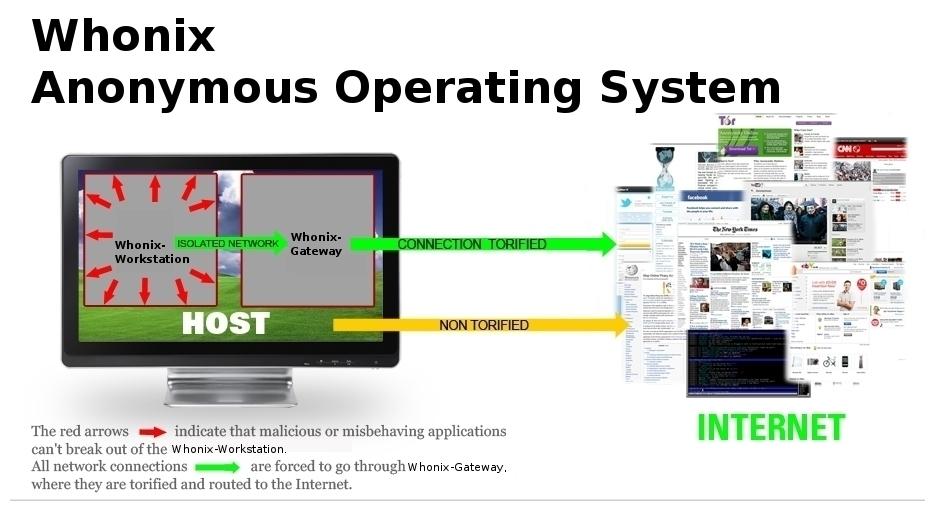
Whonix is an anonymous general purpose operating system based on Virtual Box, Ubuntu GNU/Linux and Tor. By Whonix design, IP and DNS leaks are impossible. Not even malware with root rights can find out the user’s real IP/location.
Whonix consists of two machines, which are connected through an isolated network. One machine acts as the client or Whonix-Workstation, the other as a proxy or Whonix-Gateway, which will route all of the Whonix-Workstation’s traffic through Tor. This setup can be implemented either through virtualization and/or Physical Isolation.
Whonix advantages:
- All applications, including those, which do not support proxy settings, will automatically be routed through Tor.
- Installation of any software package possible.
- Safe hosting of Hidden services possible.
- Protection against side channel attacks, no IP or DNS leaks possible^3^ To test for leaks, see LeakTests.
- Advantage over Live CD’s: Tor’s data directory is still available after reboot, due to persistent storage. Tor requires persistent storage to save it’s Entry Guards.
- Java / JavaScript / flash / Browser Plugins / misconfigured applications cannot leak your real external IP.
- Whonix does even protect against root exploits (Malware with root rights) on the Workstation.
- Uses only Free Software.
- Building Whonix from source is easy.
- Tor+Vidalia and Tor Browser are not running inside the same machine. That means that for example an exploit in the browser can’t affect the integrity of the Tor process.
- It is possible to use Whonix setup in conjunction with VPNs, ssh and other proxies. But see Tor plus VPN/proxies Warning. Everything possible, as first chain or last chain, or both.
- Loads of Optional Configurations (additional features / Add-Ons) available.
- Best possible Protocol-Leak-Protection and Fingerprinting-Protection.

Jul 11, 2012 | Anonymous

VPNs and SSH tunnels can both securely “tunnel” network traffic over an encrypted connection. They’re similar in some ways, but different in others – if you’re trying to decide which to use, it helps to understand how each works.
An SSH tunnel is often referred to as a “poor man’s VPN” because it can provide some of the same features as a VPN without the more complicated server setup process – however, it has some limitations.
How a VPN Works
VPN stands for “virtual private network,” – as its name indicates, it’s used for connecting to private networks over public networks, such as the Internet. In a common VPN use case, a business may have a private network with file shares, networked printers, and other important things on it. Some of the business’s employees may travel and frequently need to access these resources from the road. However, the business doesn’t want to expose their important resources to the public Internet. Instead, the business can set up a VPN server and employees on the road can connect to the company’s VPN. Once an employee is connected, their computer appears to be part of the business’s private network – they can access file shares and other network resources as if they were actually on the physical network.

The VPN client communicates over the public Internet and sends the computer’s network traffic through the encrypted connection to the VPN server. The encryption provides a secure connection, which means the business’s competitors can’t snoop on the connection and see sensitive business information. Depending on the VPN, all the computer’s network traffic may be sent over the VPN – or only some of it may (generally, however, all network traffic goes through the VPN). If all web browsing traffic is sent over the VPN, people between the VPN client and server can’t snoop on the web browsing traffic. This provides protection when using public Wi-Fi networks and allows users to access geographically-restricted services – for example, the employee could bypass Internet censorship if they’re working from a country that censors the web. To the websites the employee accesses through the VPN, the web browsing traffic would appear to be coming from the VPN server.

Crucially, a VPN works more at the operating system level than the application level. In other words, when you’ve set up a VPN connection, your operating system can route all network traffic through it from all applications (although this can vary from VPN to VPN, depending on how the VPN is configured). You don’t have to configure each individual application.
To get started with your own VPN, see our guides to using OpenVPN on a Tomato router, installing OpenVPN on a DD-WRT router, or setting up a VPN on Debian Linux.
How an SSH Tunnel Works
SSH, which stands for “secure shell,” isn’t designed solely for forwarding network traffic. Generally, SSH is used to securely acquire and use a remote terminal session – but SSH has other uses. SSH also uses strong encryption, and you can set your SSH client to act as a SOCKS proxy. Once you have, you can configure applications on your computer – such as your web browser – to use the SOCKS proxy. The traffic enters the SOCKS proxy running on your local system and the SSH client forwards it through the SSH connection – this is known as SSH tunneling. This works similarly to browsing the web over a VPN – from the web server’s perspective, your traffic appears to be coming from the SSH server. The traffic between your computer and the SSH server is encrypted, so you can browse over an encrypted connection as you could with a VPN.

However, an SSH tunnel doesn’t offer all the benefits of a VPN. Unlike with a VPN, you must configure each application to use the SSH tunnel’s proxy. With a VPN, you’re assured that all traffic will be sent through the VPN – but you don’t have this assurance with an SSH tunnel. With a VPN, your operating system will behave as though you’re on the remote network – which means connecting to Windows networked file shares would be easy. It’s considerably more difficult with an SSH tunnel.

For more information about SSH tunnels, see this guide to creating an SSH tunnel on Windows with PuTTY. To create an SSH tunnel on Linux, see our list of cool things you can do with an SSH server.
Which Is More Secure?
If you’re worried about which is more secure for business use, the answer is clearly a VPN — you can force all network traffic on the system through it. However, if you just want an encrypted connection to browse the web with from public Wi-Fi networks in coffee shops and airports, a VPN and SSH server both have strong encryption that will serve you well.
There are other considerations, too. Novice users can easily connect to a VPN, but setting up a VPN server is a more complex process. SSH tunnels are more daunting to novice users, but setting up an SSH server is simpler – in fact, many people will already have an SSH server that they access remotely. If you already have access to an SSH server, it’s much easier to use it as an SSH tunnel than it is to set up a VPN server. For this reason, SSH tunnels have been dubbed a “poor man’s VPN.”
Businesses looking for more robust networking will want to invest in a VPN. On the other hand, if you’re a geek with access to an SSH server, an SSH tunnel is an easy way to encrypt and tunnel network traffic – and the encryption is just as good as a VPN’s encryption.
SOURCE: HowToGeek.com

May 21, 2012 | Anonymous

This is a guide with which even a total noob can get high class security for his system and complete anonymity online. But its not only for noobs, it contains a lot of tips most people will find pretty helpfull. It is explained so detailed even the biggest noobs can do it^^ :
=== The Ultimate Guide for Anonymous and Secure Internet Usage v1.0.1 ===
Table of Contents:
- Obtaining Tor Browser
- Using and Testing Tor Browser for the first time
- Securing Your Hard Drive
- Setting up TrueCrypt, Encrypted Hidden Volumes
- Testing TrueCrypt Volumes
- Securing your Hard Disk
- Temporarily Securing Your Disk, Shredding Free Space
- Installing VirtualBox
- Installing a Firewall
- Firewall Configuration
- Installing Ubuntu
- Ubuntu Initial Setup
- Installing Guest Additions
- Installing IRC (Optional)
- Installing Torchat (Optional)
- Creating TOR-Only Internet Environment
- General Daily Usage
By the time you are finished reading and implementing this guide, you will be able to securely and anonymously browse any website and to do so anonymously. No one not even your ISP or a government agent will be able to see what you are doing online. If privacy and anonymity is important to you, then you owe it to yourself to follow the instructions that are presented here.
In order to prepare this guide for you, I have used a computer that is running Windows Vista. This guide will work equally well for other versions of Windows. If you use a different operating system, you may need to have someone fluent in that operating system guide you through this process. However, most parts of the process are easily duplicated in other operating systems.
I have written this guide to be as newbie friendly as possible. Every step is fully detailed and explained. I have tried to keep instructions explicit as possible. This way, so long as you patiently follow each step, you will be just fine.
In this guide from time to time you will be instructed to go to certain URLs to download files. You do NOT need TOR to get these files, and using TOR (while possible) will make these downloads very slow.
This guide may appear overwhelming. Every single step is explained thoroughly and it is just a matter of following along until you are done. Once you are finished, you will have a very secure setup and it will be well worth the effort. Even though the guide appears huge, this whole process should take at the most a few hours. You can finish it in phases over the course of several days.
It is highly recommended that you close *ALL* applications running on your computer before starting.
SOURCE:
http://www.cyberguerrilla.org/?p=3322
Jan 15, 2012 | Activism, Anonymous

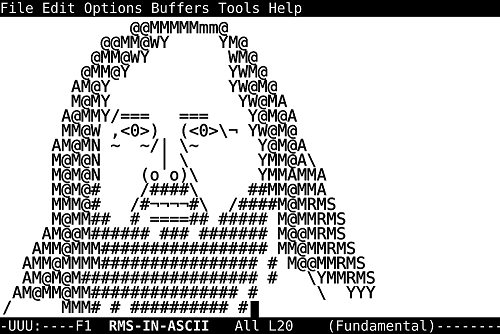
Richard Stallman Was Right All Along:
Late last year, president Obama signed a law that makes it possible to indefinitely detain terrorist suspects without any form of trial or due process. Peaceful protesters in Occupy movements all over the world have been labelled as terrorists by the authorities. Initiatives like SOPA promote diligent monitoring of communication channels. Thirty years ago, when Richard Stallman launched the GNU project, and during the three decades that followed, his sometimes extreme views and peculiar antics were ridiculed and disregarded as paranoia – but here we are, 2012, and his once paranoid what-ifs have become reality.
Up until relatively recently, it’s been easy to dismiss Richard Stallman as a paranoid fanatic, someone who lost touch with reality long ago. A sort of perpetual computer hippie, the perfect personification of the archetype of the unworldly basement-dwelling computer nerd. His beard, his hair, his outfits – in our visual world, it’s simply too easy to dismiss him.
His views have always been extreme. His only computer is a Lemote Yeelong netbook, because it’s the only computer which uses only Free software – no firmware blobs, no proprietary BIOS; it’s all Free. He also refuses to own a mobile phone, because they’re too easy to track; until there’s a mobile phone equivalent of the Yeelong, Stallman doesn’t want one. Generally, all software should be Free. Or, as the Free Software Foundation puts it:
As our society grows more dependent on computers, the software we run is of critical importance to securing the future of a free society. Free software is about having control over the technology we use in our homes, schools and businesses, where computers work for our individual and communal benefit, not for proprietary software companies or governments who might seek to restrict and monitor us.
I, too, disregarded Stallman as way too extreme. Free software to combat controlling and spying governments? Evil corporations out to take over the world? Software as a tool to monitor private communication channels? Right. Surely, Free and open source software is important, and I choose it whenever functional equivalence with proprietary solutions is reached, but that Stallman/FSF nonsense is way out there.
But here we are, at the start of 2012. Obama signed the NDAA for 2012, making it possible for American citizens to be detained indefinitely without any form of trial or due process, only because they are terrorist suspects. At the same time, we have SOPA, which, if passed, would enact a system in which websites can be taken off the web, again without any form of trial or due process, while also enabling the monitoring of internet traffic. Combine this with how the authorities labelled the Occupy movements – namely, as terrorists – and you can see where this is going.
In case all this reminds you of China and similarly totalitarian regimes, you’re not alone. Even the Motion Picture Association of America, the MPAA, proudly proclaims that what works for China, Syria, Iran, and others, should work for the US. China’s Great Firewall and similar filtering systems are glorified as workable solutions in what is supposed to be the free world.
The crux of the matter here is that unlike the days of yore, where repressive regimes needed elaborate networks of secret police and informants to monitor communication, all they need now is control over the software and hardware we use. Our desktops, laptops, tablets, smartphones, and all manner of devices play a role in virtually all of our communication. Think you’re in the clear when communicating face-to-face? Think again. How did you arrange the meet-up? Over the phone? The web? And what do you have in your pocket or bag, always connected to the network?
This is what Stallman has been warning us about all these years – and most of us, including myself, never really took him seriously. However, as the world changes, the importance of the ability to check what the code in your devices is doing – by someone else in case you lack the skills – becomes increasingly apparent. If we lose the ability to check what our own computers are doing, we’re boned.
That’s the very core of the Free Software Foundation’s and Stallman’s beliefs: that proprietary software takes control away from the user, which can lead to disastrous consequences, especially now that we rely on computers for virtually everything we do. The fact that Stallman foresaw this almost three decades ago is remarkable, and vindicates his activism. It justifies 30 years of Free Software Foundation.
And, in 2012, we’re probably going to need Free and open source software more than ever before. At the Chaos Computer Congress in Berlin late last year, Cory Doctorow held a presentation titled “The Coming War on General Purpose Computation“. In it, Doctorow warns that the general purpose computer, and more specifically, user control over general purpose computers, is perceived as a threat to the establishment. The copyright wars? Nothing but a prelude to the real war.
“As a member of the Walkman generation, I have made peace with the fact that I will require a hearing aid long before I die, and of course, it won’t be a hearing aid, it will be a computer I put in my body,” Doctorow explains, “So when I get into a car – a computer I put my body into – with my hearing aid – a computer I put inside my body – I want to know that these technologies are not designed to keep secrets from me, and to prevent me from terminating processes on them that work against my interests.”
And this is really the gist of it all. With computers taking care of things like hearing, driving, and more, we really can’t afford to be locked out of them. We need to be able to peek inside of them and see what they’re doing, to ensure we’re not being monitored, filtered, or whatever. Only a short while ago I would’ve declared this as pure paranoia – but with all that’s been going on recently, it’s no longer paranoia. It’s reality.
“Freedom in the future will require us to have the capacity to monitor our devices and set meaningful policy on them, to examine and terminate the processes that run on them, to maintain them as honest servants to our will, and not as traitors and spies working for criminals, thugs, and control freaks,” Doctorow warns, “And we haven’t lost yet, but we have to win the copyright wars to keep the Internet and the PC free and open. Because these are the materiel in the wars that are to come, we won’t be able to fight on without them.”
This is why you should support Android (not Google, but Android), even if you prefer the iPhone. This is why you should support Linux, even if you use Windows. This is why you should support Apache, even if you run IIS. There’s going to be a point where being Free/open is no longer a fun perk, but a necessity.
And that point is approaching fast.
SOURCE by Thom Holwerda on Mon 2nd Jan 2012 19:12 UTC